
A CRC error is one of the few computer errors that is genuinely unambiguous. It is not a permissions problem, a driver quirk, or a misconfiguration. It means one thing: the data that came back does not match the data that was stored, and the system can prove it mathematically. Everything else — which drive, which cable, which file — is diagnosis.
Most pages ranking for this term jump straight to "run chkdsk." That advice is sometimes right and sometimes the single worst thing you can do. The difference depends on what caused the error, which is why the mechanism matters.
What CRC Actually Is
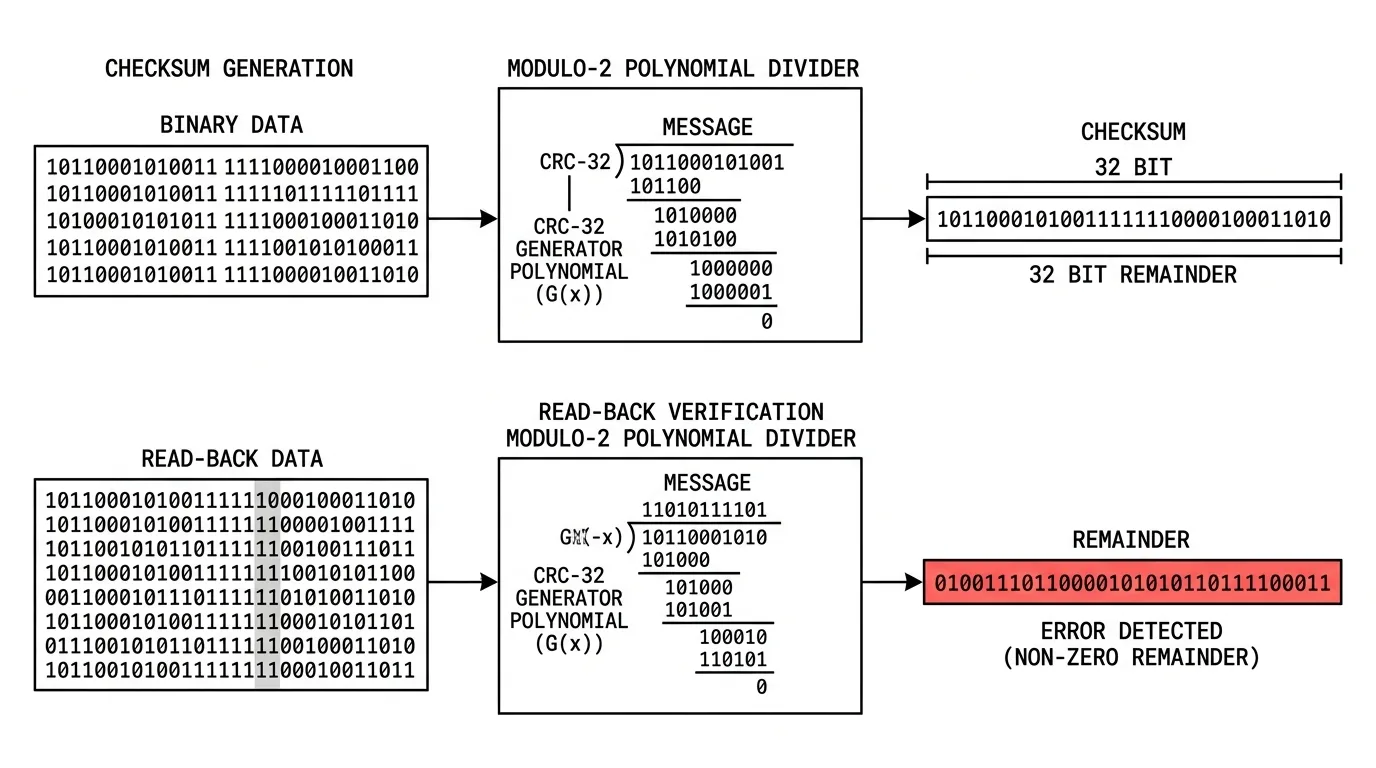
CRC stands for Cyclic Redundancy Check. It is an error-detecting code — note: detecting, not correcting — invented by W. Wesley Peterson in 1961 and now embedded in essentially every storage and transmission layer in computing.
The mechanism is polynomial division over a binary field, which sounds worse than it is:
- Treat the block of data as one enormous binary number.
- Divide it by a fixed, agreed-upon binary constant called the generator polynomial.
- Discard the quotient. Keep the remainder — typically 32 bits. That remainder is the CRC checksum.
- Store or transmit the checksum alongside the data.
- On read, repeat the division on the received data and compare remainders.
If the two remainders differ, at least one bit changed. The check is cheap enough to run in hardware at line rate, which is why it appears in Ethernet frames, ZIP and RAR archives, hard-drive sectors, PNG chunks, SATA and PCIe links, and the CAN bus in your car.
Detecting Is Not Correcting — This Is the Crucial Distinction
CRC tells you data is wrong. It cannot tell you which bit is wrong, and it cannot repair it. That is a different family of codes — error-correcting codes such as Reed–Solomon, LDPC, and the ECC used in server memory. This distinction explains the behaviour that frustrates people most: the system knows the file is damaged but flatly refuses to give you a "fix it" button. There is nothing to fix with. The information needed to reconstruct the original bits was never stored.
What CRC-32 Can and Cannot Catch
| Error pattern | CRC-32 detection |
|---|---|
| Any single-bit error | Always detected |
| Any odd number of bit errors | Always detected (with standard polynomials) |
| Any burst error up to 32 bits long | Always detected |
| Random large-scale corruption | Detected with probability ≈ 1 − 2⁻³² (about 99.99999998%) |
| Deliberate tampering | Not protected — CRC is not cryptographic |
That last row matters more than people realise. CRC is trivially forgeable: an attacker who modifies data can recompute a valid CRC. It defends against noise, not adversaries. Integrity against tampering requires a cryptographic hash or MAC.
The Error Variants and What Each One Means
The wording of the message narrows the cause considerably.
| Message | Where it comes from | Most likely cause |
|---|---|---|
| "Data error (cyclic redundancy check)" | Windows file copy / disk read | Failing sectors on source media, or a bad cable/connection |
| "CRC failed in filename" | WinRAR / 7-Zip extraction | Incomplete or corrupted download, or a damaged archive volume |
| CRC errors in network interface counters | Switch or NIC statistics | Bad cable, duplex mismatch, EMI, failing transceiver |
| SMART attribute: UDMA CRC Error Count | Drive self-monitoring | Almost always the SATA cable or port — not the drive platters |
| CRC error during optical disc read | DVD/BD drive | Surface damage, disc rot, dirty lens |
The One Most People Get Wrong: UDMA CRC Error Count
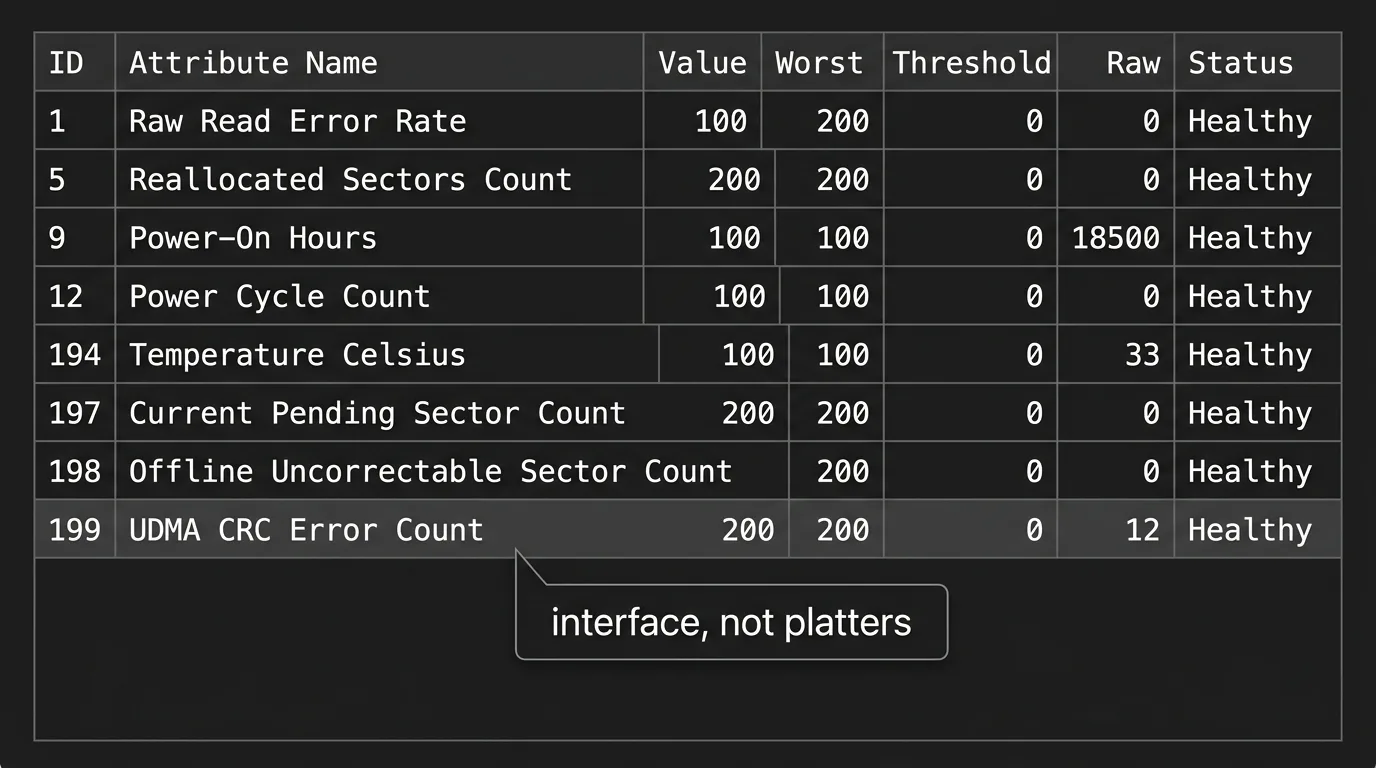
This SMART attribute counts CRC failures on the interface between drive and controller — not on the storage medium. A rising UDMA CRC Error Count almost always means a marginal SATA cable, a poorly seated connector, a failing port, or interference — and almost never means the drive is dying. Threads on r/DataHoarder and r/buildapc are full of people who replaced a healthy drive when a $4 cable would have fixed it.
Two properties worth knowing: the counter is monotonic — it never resets, so a historical count from a cable you already replaced will sit there forever and alarm you repeatedly — and the errors are usually recovered transparently by retransmission, meaning your data was fine even though the counter incremented. What matters is whether the count is increasing, not what it is.
Root Causes, Ranked by How Often They're Actually It
- Cables and connectors. The most common cause by a wide margin, and the cheapest to rule out. Marginal SATA cables, unlatched connectors, cheap USB cables, damaged Ethernet runs. Swap before you diagnose anything else.
- Incomplete downloads. The dominant cause of archive CRC failures. A connection dropped, a proxy truncated the stream, or the file was corrupted server-side. Compare file size and hash against the source before assuming disk trouble.
- Physical media degradation. Bad sectors on spinning disks, worn NAND cells on SSDs and flash drives, disc rot on optical media. This is the case where the data really is gone.
- Improper ejection. Pulling a USB drive mid-write leaves a partially updated filesystem and half-written blocks.
- Failing RAM. Underrated and genuinely nasty: memory that flips bits will corrupt data before it is written, meaning the CRC stored on disk is a correct checksum of already-wrong data. The file will read back clean and be silently wrong. Any unexplained pattern of corruption warrants a memory test.
- Power interruption during write. Especially damaging on drives without power-loss protection.
- Overclocking instability. Unstable memory or bus timings produce intermittent CRC failures that vanish at stock settings.
Fixing It: The Order That Doesn't Destroy Your Data
Rule one: if the data matters, image the drive before running any repair tool. This is the step almost every quick-fix article omits, and it is the difference between a recoverable situation and a permanent loss.
- Stop writing to the affected drive. Every additional write reduces recovery odds.
- Swap the cable and change the port. Free, thirty seconds, and resolves a large share of cases.
- Re-download, if it's an archive. Verify against the publisher's checksum if one is published. Multi-part archives need every volume present and complete.
- Read SMART data. Distinguish interface errors (UDMA CRC Error Count) from media errors (Reallocated Sector Count, Current Pending Sector, Uncorrectable Sector Count). These point at completely different repairs.
- Make a sector-by-sector image using a tool that retries and skips bad sectors rather than aborting. Do all further work on the image, never the original.
- Then attempt repair — filesystem check, archive repair function, or file-recovery software — against the copy.
Why "just run chkdsk" Can Be Harmful
Filesystem check utilities are designed to restore filesystem consistency, not to preserve your files. Running one on a physically failing drive does two damaging things: it forces heavy read-write activity across a dying surface, accelerating failure; and in resolving inconsistencies it may discard partially readable data or relocate fragments into unnamed recovery folders. On a drive whose problem is a bad cable, it's harmless and pointless. On a drive with pending sectors, it can be the thing that turns "mostly recoverable" into "gone." Image first, always.
What Recovery Realistically Looks Like
Expectations are worth setting honestly. If the CRC error is caused by a cable, interface, or transfer problem, recovery is complete — the data was never damaged. If the error is caused by media failure, the damaged region is genuinely unrecoverable by software, and what you get back is everything except the affected blocks. For a video file that may mean a brief glitch; for a database or an encrypted container it may mean total loss. No software can reconstruct bits that no longer exist; anything claiming to "repair CRC errors" is either re-reading with more retries, or discarding the bad region and rebuilding the container around it.
Prevention
- Keep three copies, on two media types, one offsite. CRC tells you a copy has failed — it only helps if there's another copy.
- Use a filesystem with built-in checksumming and self-healing on redundant storage, so silent corruption is caught and repaired automatically rather than surfacing years later.
- Run scheduled scrubs on archival storage. Corruption found early is repairable from parity; corruption found at restore time is not.
- Use ECC memory for anything where silent bit-flips would be catastrophic. Corrupted archives and unreadable files are also a common symptom of the kind of software problems covered in our look at how popular utility software gets evaluated.
- Replace SATA and USB cables when a CRC counter starts climbing — a marginal cable costs almost nothing to eliminate.
- Eject removable media properly, every time.
Frequently Asked Questions
What does a CRC error mean?
It means a cyclic redundancy check failed: the checksum calculated from the data you just read does not match the checksum stored when it was written. The data changed somewhere between writing and reading.
Can a CRC error be fixed?
It depends on the cause. If the corruption happened in transit — a bad cable, an interrupted download, a network fault — then yes, completely, because the original data is intact at the source. If the storage medium itself has degraded, the affected data is gone; CRC detects errors but cannot correct them.
Does a CRC error mean my hard drive is failing?
Not necessarily. A rising UDMA CRC Error Count in SMART data points at the SATA cable or port, not the drive platters, and is one of the most commonly misread indicators in computing. Media failure shows up in different SMART attributes such as Reallocated Sector Count and Current Pending Sector Count.
Why does WinRAR say CRC failed?
Usually because the archive was incompletely or incorrectly downloaded, or because one volume of a multi-part archive is missing or damaged. Re-download and verify against the publisher's checksum before assuming a disk problem.
Should I run chkdsk on a CRC error?
Not before imaging the drive. Filesystem repair tools prioritise filesystem consistency over your files, and on physically failing media the heavy read-write activity can accelerate failure and discard partially readable data. Copy the drive sector by sector first, then work on the copy.
Is CRC the same as a cryptographic hash?
No. CRC detects accidental corruption from noise and is deliberately cheap. It offers no protection against deliberate tampering, because an attacker who alters data can simply recompute a valid CRC. Integrity against tampering requires a cryptographic hash or message authentication code.