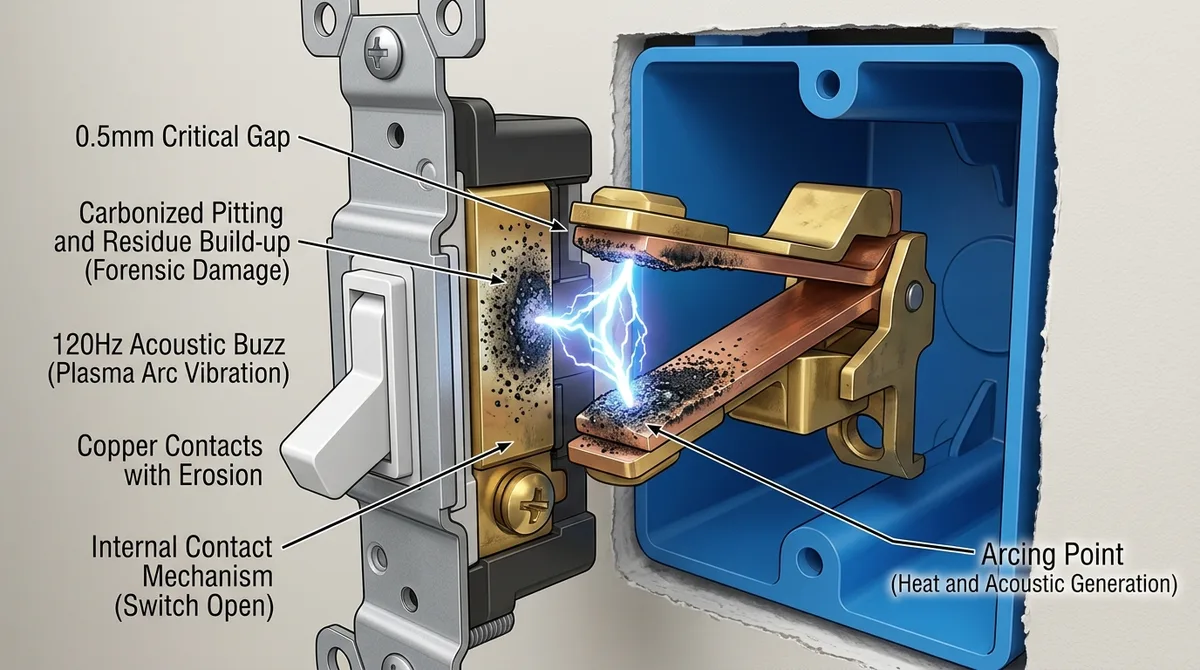
A light switch that makes noise is telling you something specific — and the type of sound matters more than the volume. Electrical failures are involved in roughly 13% of U.S. home structure fires, and the sounds a failing switch makes are among the earliest warnings you get. Here's how to read them, from the benign to the call-an-electrician-today.
Read the Sound First
| Sound | Likely cause | Action |
|---|---|---|
| Steady low hum (dimmer) | Magnetostriction in the dimmer's filter coil | Often normal; check load compatibility and heat |
| Rhythmic buzz | Overloaded circuit or failing component | Reduce bulb wattage; investigate |
| Sharp crackle or pop | Active electrical arcing | Turn off the breaker; call an electrician |
| Hissing or sizzling | Advanced arcing / carbon tracking | Breaker off immediately; emergency repair |
The Harmless Hum: Dimmer Physics
A faint, steady 120 Hz hum from a dimmer is usually engineering, not failure. Standard dimmers use a TRIAC — a high-speed electronic switch that "chops" the AC waveform 120 times per second to reduce light output. That chopping creates abrupt current spikes, and to keep those spikes from disrupting nearby electronics, dimmers include an RFI-suppression choke: copper wire wound around an iron core.
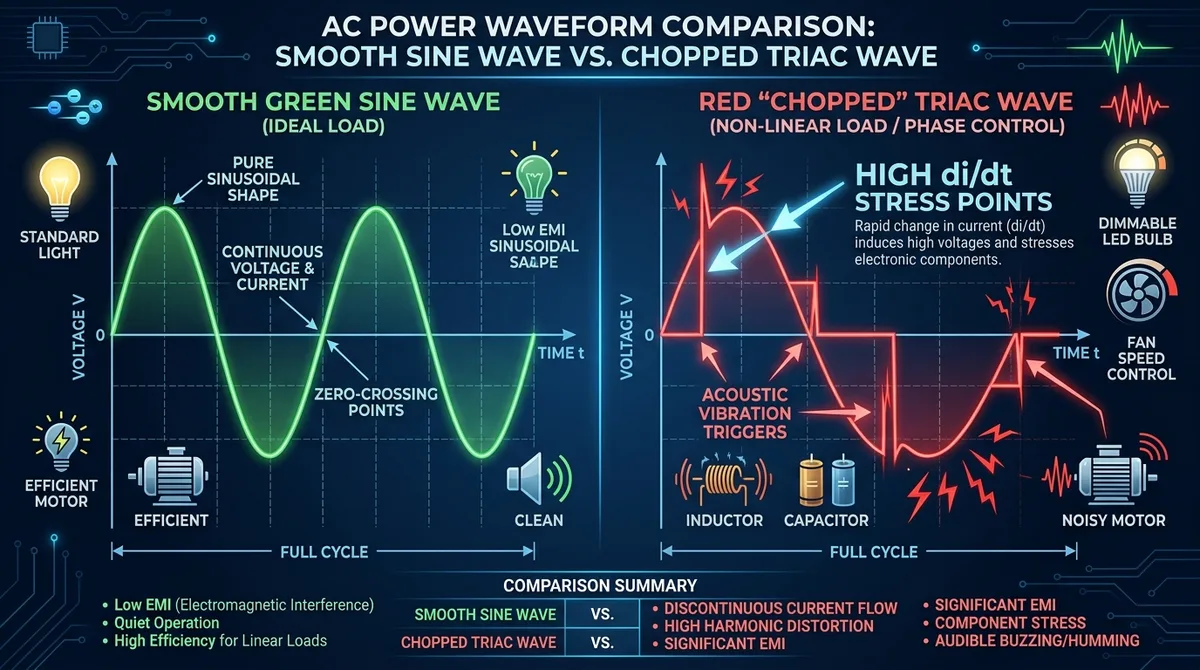
The chopped current makes that iron core microscopically expand and contract in sync with the magnetic field — a phenomenon called magnetostriction — and that physical vibration is the hum you hear. It's most noticeable when the dimmer runs near its maximum wattage rating or drives older incandescent or halogen bulbs whose filaments resonate. A faint hum under those conditions is generally acceptable; a hum paired with heat at the switch plate is not.
The Dangerous Sounds: Arcing and Carbon Tracking
Crackling, popping, or hissing marks a different physical process entirely: electricity jumping an air gap. A loose wire under a terminal screw or a worn internal contact forces current to arc — a plasma discharge hot enough to exceed 10,000°F at the contact point.
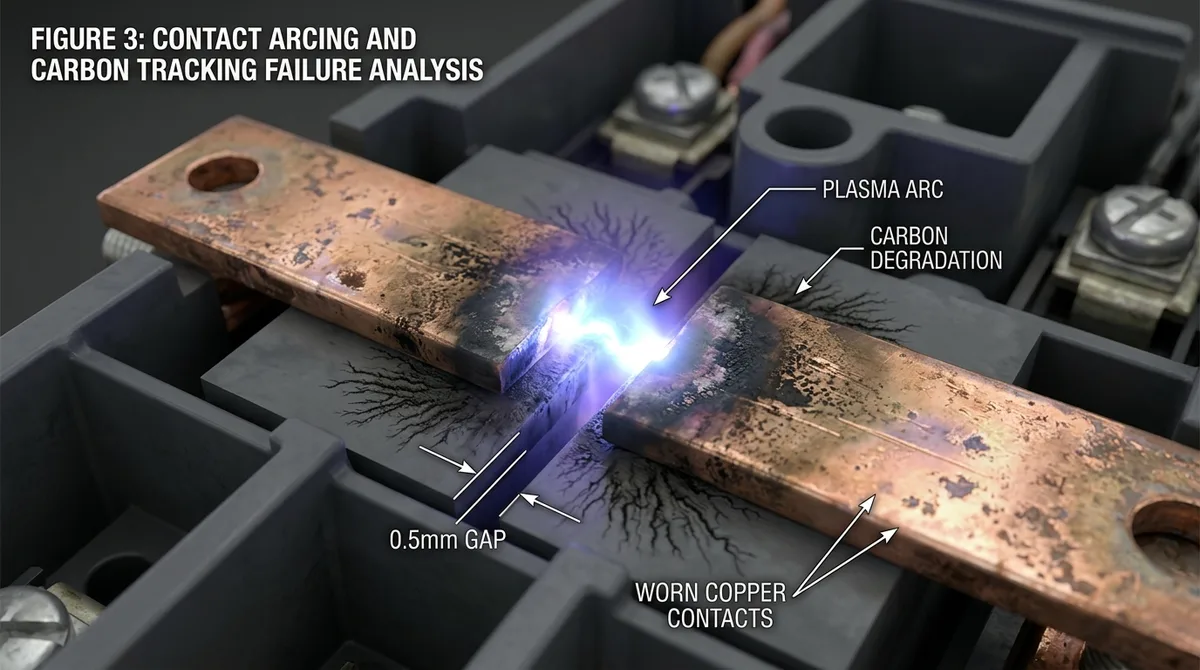
The under-appreciated danger is what arcing leaves behind. That heat chars the plastic housing into conductive carbon — "carbon tracking" — which forms a permanent electrical path across surfaces that were designed to be insulators. Once a carbon track is established, current can keep flowing and heating even with the switch turned off. That's why an arcing switch isn't a "deal with it eventually" problem: flipping it off doesn't remove the hazard. Breaker off, switch replaced.
A related pattern electricians flag constantly in diagnostic threads: "back-stabbed" connections, where installers pushed wires into the quick-connect holes on the back of the device instead of wrapping them around the terminal screws. Those spring contacts loosen over years of thermal cycling and are a disproportionate source of intermittent arcing, buzzing, and flickering.
The LED Plot Twist: When the "Upgrade" Causes the Buzz
A switch that started buzzing right after you installed LED bulbs is usually suffering a compatibility conflict, not a failure. Two mechanisms:
- Driver resonance: older "leading-edge" TRIAC dimmers produce abrupt voltage spikes that make the capacitors and coils inside cheap LED drivers physically vibrate — turning the bulb and switch into tiny speakers. A trailing-edge (ELV) dimmer designed for LEDs typically silences it.
- Minimum load "hunting": traditional dimmers need roughly 40–60W of load to hold their TRIAC stable. A single 9W LED doesn't provide it, so the dimmer rapidly fires and misfires — audible as erratic buzzing, visible as flicker.
Smart Switches: The Click That's Supposed to Be There
If your smart switch makes a distinct "thunk" or click when toggled, that's a mechanical relay doing its job — an electromagnet physically snapping a copper contact into place. Relay-based on/off switches click; solid-state smart dimmers are silent. One nuance from smart-home communities: buzzing in smart switches installed without a neutral wire is common, because "no-neutral" devices power themselves by leaking a small current through the bulb, generating electronic noise. (Electrical code has required neutrals in new switch boxes since 2011 partly for this reason.)
The Weird One: Air Blowing Out of a Buzzing Switch
Some homeowners investigating a buzz notice a draft coming through the switch plate and fear it's something exotic. It's building science: switch boxes on exterior walls have unsealed wire openings, and a loose, heat-generating connection creates a small thermal plume that pulls air through the wall cavity — amplified by the whole-house "stack effect" that pushes air from lower floors to upper ones through any available gap. The draft itself is harmless, but a draft plus a buzz suggests a heat-producing loose connection worth an inspection. (Interestingly, a genuinely burning connection usually announces itself by smell first — the same fishy warning odor covered in our guide to burning smells from electronics.)
What a Professional Actually Does
- Load observation: does the sound scale with wattage? That points to magnetostriction or overload rather than arcing.
- Continuity testing (power off): fluctuating resistance across the switch terminals reveals failed internal contacts.
- Thermal imaging: a spot more than 10–15°F above ambient behind the plate flags a high-resistance connection.
- Insulation testing: for chronic cases, a megohmmeter check below ~20 megohms confirms carbon tracking — the switch body itself has become partially conductive and must be replaced.
Modern code has evolved around exactly these failure modes: terminal screws now carry specified torque values (loose, hand-tightened terminals loosen further over decades of thermal cycling), and arc-fault circuit interrupter (AFCI) breakers are designed to recognize the electrical signature of an arc and trip before ignition. If a switch buzzes but an AFCI never trips, a "series arc" at a single terminal may be evading detection — older AFCI technology catches those less reliably.
The Bottom Line
A faint dimmer hum with compatible bulbs and no heat: acceptable. Any crackle, pop, sizzle, buzzing paired with warmth, flickering, or scorch smell: breaker off, electrician in. And if the switch is older than 15–20 years and has ever arced, replace it rather than re-tighten it — pitted, carbon-tracked contacts stay hazardous no matter how snug the screws are.
Frequently Asked Questions
Why does the switch buzz only with one specific brand of LED?
Cheap LED drivers with minimal filtering resonate with the dimmer's voltage spikes; better-shielded bulbs don't. Either switch bulb brands or upgrade to a trailing-edge dimmer rated for LED loads.
Is it safe to just tighten the terminal screws myself?
With the breaker off, tightening can fix a buzz from a loose wire. But if the switch has been arcing for a while, its contacts may already be pitted and carbon-tracked — tight screws don't fix that. When in doubt, replace the switch; they cost a few dollars.
What if I hear buzzing in the wall near the switch, not in it?
That points to arcing inside a junction box or a loose neutral on a multi-wire circuit — both electrician territory, and more urgent than a noisy switch because the fault is concealed.
The switch sparks when I flip it — replace it?
A tiny, momentary spark as contacts close is normal for mechanical switches. A flash visible through the cover plate or a spark with a loud pop means contact damage — replace it immediately.