Search "top programming tutorials" and you get ranked lists. Nearly all of them share a structural problem: the ordering is driven by affiliate commission, not by learning outcomes, and the same six platforms appear in the same order across dozens of sites. None of them tell you the thing that actually determines whether you learn to code — which is not which tutorial you pick, but how you use it.
This guide is deliberately not another ranking. It is the evaluation framework the rankings skip.
The Six Formats, and What Each Is Actually Good At
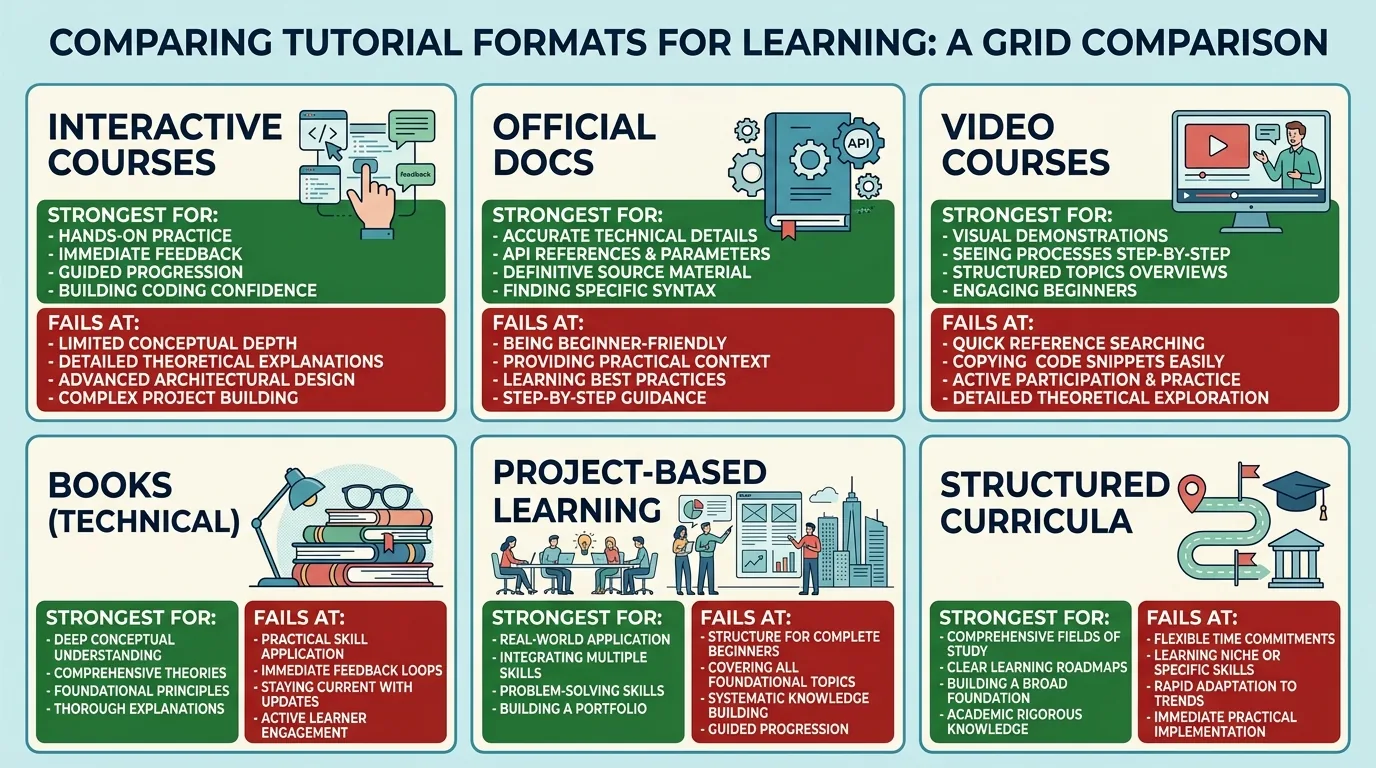
| Format | Strongest for | Weakest for | Failure mode |
|---|---|---|---|
| Interactive browser courses | Absolute beginners; syntax fluency | Environment setup, debugging, tooling | You can pass every exercise and still not be able to start a project on your own machine |
| Official documentation tutorials | Accuracy; staying current | Motivation; assumed prior knowledge | Written by maintainers for peers, not for learners |
| Long-form video courses | Following a full build end to end | Retention; reference lookup | Passive watching feels like progress and isn’t |
| Books | Depth, mental models, ordering of concepts | Currency; toolchain specifics | Code samples rot faster than the ideas do |
| Project-based / build-along | Transfer to real work | Foundations; gaps go unnoticed | You ship the app but can’t explain any decision in it |
| Structured curricula (open-source) | Sequencing; knowing what comes next | Pace; can feel slow | Dropout at the point where difficulty steps up |
The practical implication: no single format is sufficient. The combination that reliably works is one structured curriculum for sequencing + official docs for accuracy + projects for transfer. Video is a supplement, not a spine.
The Evaluation Checklist
Apply these to any tutorial before you commit weeks to it. Five or more failures means move on.
- Date and version. Check when it was last updated and which language/framework version it targets. A JavaScript tutorial written pre-2015 syntax, or a Python tutorial still on 2.x, will teach you patterns that reviewers reject.
- Does it make you type? Passive-only tutorials produce recognition, not recall. If nothing forces you to write code from a blank file, it is entertainment.
- Does it explain why? A tutorial that says "add this line" without saying what breaks if you don't has taught you a ritual, not a concept.
- Does it show failure? The best tutorials deliberately break the program and walk you through reading the error. Error literacy is the single highest-leverage skill and the one most commonly skipped.
- Is there an exit ramp to independence? Look for explicit "now build this yourself, no instructions" checkpoints.
- Does it cover environment and tooling? Git, package management, a debugger, and a terminal. Tutorials that keep you in a browser sandbox forever are deferring the hardest part.
- Is the community visible? An active issue tracker, forum, or subreddit where people post the exact errors you'll hit is worth more than production polish.
- Is the scope honest? "Learn X in 24 hours" is a marketing claim, not a syllabus.
Tutorial Hell: The Actual Mechanism
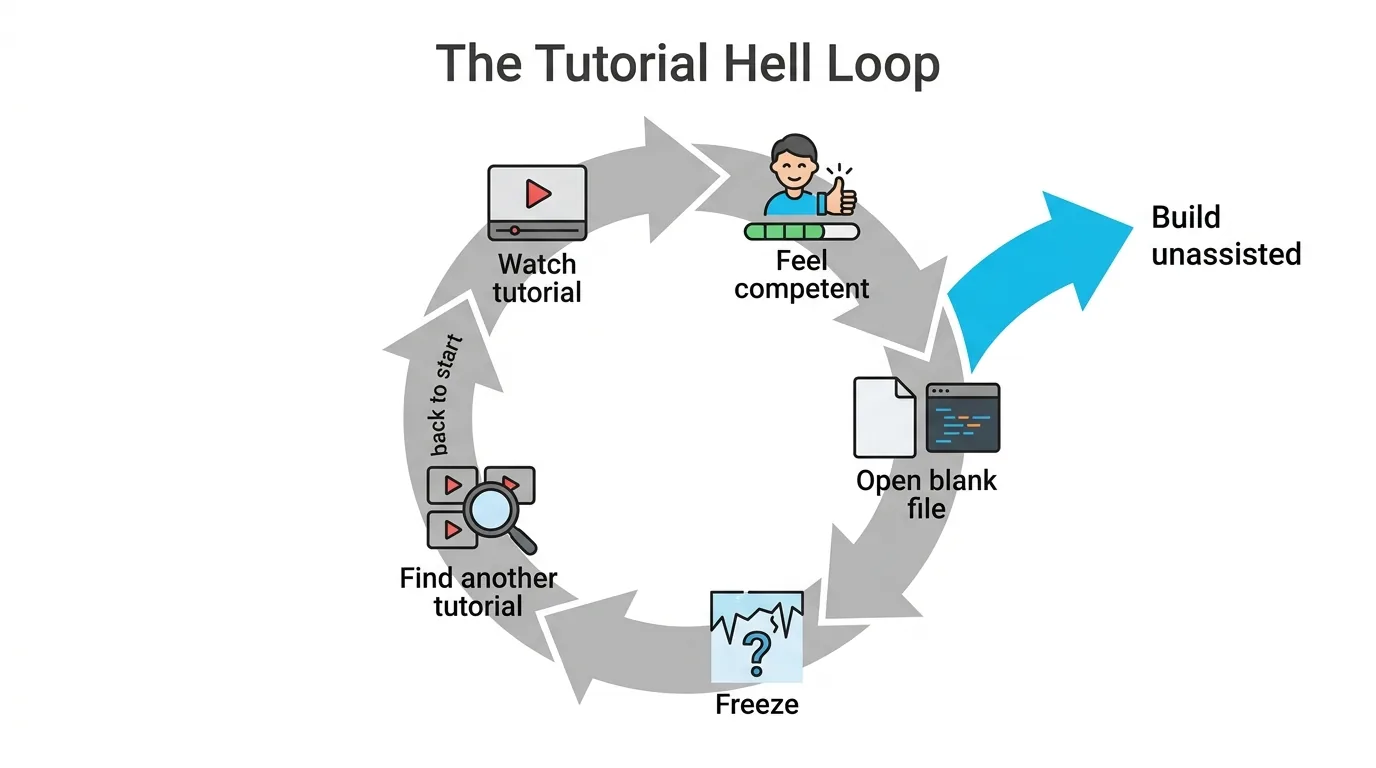
"Tutorial hell" is the state of completing tutorial after tutorial while remaining unable to build anything unaided. Discussions on r/learnprogramming return to it constantly, and the community diagnosis is more precise than the popular framing.
The popular framing says the cause is watching too many tutorials. The mechanism the experienced posters describe is different: a tutorial removes the two hardest cognitive steps — deciding what to do next, and recovering from being stuck — and those are precisely the two skills that constitute programming. You can complete fifty tutorials and never once practise either. The feeling of competence is real, because you genuinely understood every step; what's missing is the ability to generate the steps.
The exits that people report working:
- The 50% rule. For every hour of tutorial, one hour building unassisted. Non-negotiable, and harder than it sounds.
- Deliberate divergence. Follow a tutorial, then change the requirements mid-way — different data source, different feature — so the tutorial can no longer carry you.
- Rebuild from memory. Finish a tutorial project, delete it, rebuild it a week later without reference. Whatever you can't reproduce is what you never learned.
- Choose problems you actually have. The strongest retention signal reported across forum threads is personal stake: a script that solves an annoyance in your own life beats a to-do app you don't want.
- Sit in the stuck. Give yourself a fixed window — 20 to 30 minutes — of genuinely trying before looking anything up. The discomfort is the exercise.
The Free vs. Paid Question
The evidence does not support the assumption that paid tutorials teach better. What money reliably buys is sequencing, accountability, and support — not superior explanation. Several of the most respected resources in the field are free, community-maintained, and updated more often than commercial courses because they aren't tied to a re-recording budget.
Where paid genuinely earns its price: structured bootcamp-style accountability for people who won't self-pace, and narrow specialist courses where the free material genuinely doesn't exist. Where it doesn't: introductory material in mainstream languages, which is abundant and excellent for free.
Watch for the recurring complaint on r/webdev — lifetime-access courses that quietly stop being maintained. A "$15 forever" course teaching a framework version three major releases behind is more expensive than a free tutorial that's current.
Language First, Tutorial Second
Choosing the tutorial before the goal is the most common early mistake. Work backwards:
| Goal | Start with | Why |
|---|---|---|
| Automation, data, scripting | Python | Shortest path from zero to a useful result; forgiving syntax |
| Anything in a browser | JavaScript | Non-optional for web; the runtime is already installed |
| Enterprise backend | Java or C# | Where the volume of stable employment is |
| Systems, performance, embedded | C, then Rust | Memory model has to be learned explicitly |
| iOS / Android | Swift / Kotlin | First-party tooling is far ahead of cross-platform |
| Understanding the machine | C | Nothing else forces the same clarity about memory |
The one thing worth internalising: your first language is a vehicle for learning to program, not a career commitment. The second language takes a fraction of the time.
Where AI Assistants Fit
Coding assistants change the calculus but not the underlying skill requirement. Used as an explainer — "why does this error happen," "what does this line do" — they compress the feedback loop enormously. Used as a code generator during learning, they reproduce tutorial hell in faster, more convincing form: working code you cannot debug. A useful rule while learning is to accept explanations from an assistant freely and generated code sparingly, and to treat any generated block you can't rewrite by hand as a gap to close. The same caution about confident-sounding wrong answers applies; see our piece on why AI models hallucinate answers.
A Workable 12-Week Structure
- Weeks 1–2 — syntax. One interactive course. Speed matters more than depth here; you are building vocabulary.
- Weeks 3–4 — environment. Local install, editor, terminal, Git, first commits. Painful, skippable-feeling, and the step that separates people who continue from people who don't.
- Weeks 5–8 — one guided project, diverged. Follow a build-along, then change its requirements halfway.
- Weeks 9–10 — unassisted build. Small, personal, ugly. Finished beats good.
- Weeks 11–12 — read other people's code. Pick a small open-source repository and trace one feature end to end. This is the most under-practised activity in self-teaching and the closest thing to real work.
Note that only weeks 1–2 and 5–8 involve tutorials at all. That ratio is the point. Sustainable pacing matters too — the mental-model debt you accumulate by skipping fundamentals behaves much like technical debt in software development: cheap now, expensive later, and it compounds.
Frequently Asked Questions
What is the best programming tutorial for beginners?
There is no single best one, and any list claiming otherwise is usually ranked by affiliate revenue. Pick by goal and format fit: an interactive course for syntax, a structured curriculum for sequencing, official documentation for accuracy, and unassisted projects for transfer.
How long does it take to learn programming from tutorials?
Basic syntax fluency in a single language typically takes weeks. Job-ready competence typically takes a year or more of consistent practice, and the majority of that time is spent building unaided rather than following tutorials.
Are free programming tutorials as good as paid ones?
For mainstream introductory material, generally yes. Paid courses buy sequencing, accountability and support rather than better explanation, and community-maintained free resources are often updated more frequently.
What is tutorial hell and how do I escape it?
It is the state of completing tutorials continuously while remaining unable to build independently, because tutorials remove the two hardest skills — deciding what to do next and recovering from being stuck. The exits are a strict build-to-watch time ratio, deliberately diverging from tutorial requirements, rebuilding projects from memory, and tolerating being stuck before looking up an answer.
Should I use AI to learn programming?
Use it heavily as an explainer and sparingly as a generator. Generated code you cannot rewrite by hand is a knowledge gap, not progress.
Which programming language should I learn first?
Choose by goal: Python for automation and data, JavaScript for anything browser-based, Java or C# for enterprise backends, Swift or Kotlin for mobile, and C if the aim is understanding how the machine works. The first language is a learning vehicle, not a career commitment.